
Build Your Own Feature

“Any sufficiently advanced technology is indistinguishable from magic.”
—Arthur C. Clarke
It's often surprisingly easy to add something niche to your AI tool of choice. A few weeks ago, I created a restart command for Claude Code. Now that Claude mods have dropped, UI changes are even more accessible.
In today's short post, I'll explain another new tweak to my Claude Code setup.
The Problem: A Bland UI
Sometimes we all need to scroll up to previous parts of our sessions looking for information. This is particularly true during lengthy exchanges. When running Claude Code in Terminal, however, the delineation between user prompts and the AI's responses isn't always obvious. Because the default visual cues are lacking, it's easy to miss a step or instruction.
This past weekend, I decided to change that by creating a bespoke plugin.
Want a complimentary look into how your team, department, or organization uses its current tools and what it can do better?
The Solution: Adding Some Color to Claude Code
Formatting my responses differently than Claude Code's required a little back-and-forth. Ultimately, I landed on the following tweak:
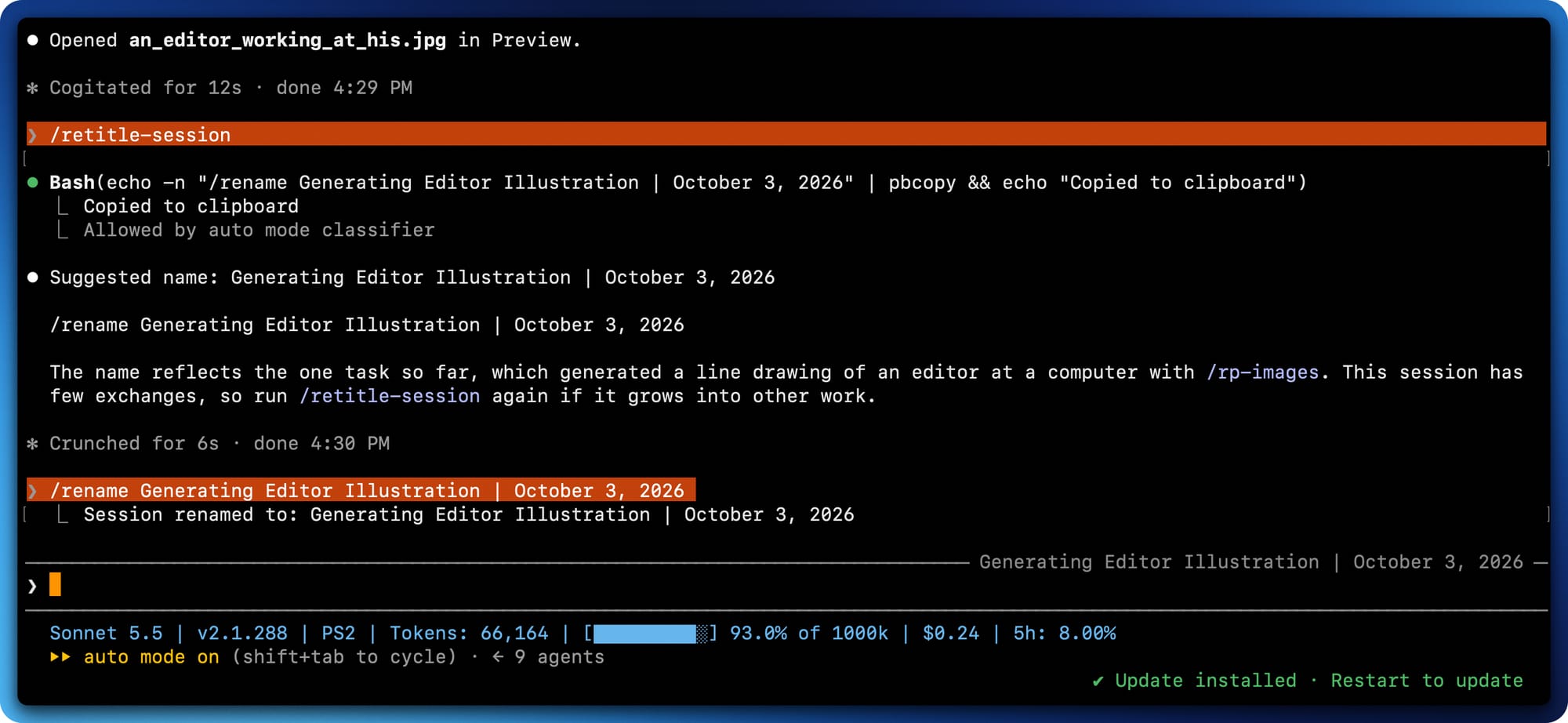
Maybe you prefer chartreuse or mauve. Go nuts. I've decided to make it public on GitHub.
claude plugin marketplace add philsimon/orange-prompt
claude plugin install orange-prompt@orange-promptOf course, tweaks like these are just the tip of the iceberg. If you want to further customize Claude Code in your Terminal, the world is your oyster.
 Phil Simon
Simon Says
There’s never been a better time to be a citizen developer.






Member discussion